
Download DVDBuilder – DVD creation, MPEG to DVD, video conversion, DVD menu, PAL, NTSC, aspect ratio, video editing, DVD burning, user-friendly
Overview
DVDBuilder is a productivity-focused application designed to assist users in creating custom DVDs from MPEG video files. The app simplifies a traditionally complex process by offering a guided, step-by-step workflow that minimizes user error and supports novice creators. Its primary purpose is to make DVD authoring accessible to individuals without technical expertise, ensuring high-quality output without requiring in-depth knowledge of video formats or DVD standards.
The target audience includes home users, educators, and content creators who need to compile and distribute video content on physical media. Whether archiving family videos, creating training materials, or producing personal documentaries, DVDBuilder provides a streamlined solution. The application’s focus on usability suggests it is tailored for users who prioritize ease of use over advanced editing capabilities.
Although the developer, DVDBuilder, did not provide additional background information, the app’s release date of August 1, 2006, indicates it was developed during a time when physical media was still widely used. This context underscores its relevance in a pre-streaming era, where DVD creation was a common need. Despite its age, the app remains functional for users seeking a straightforward tool for MPEG-to-DVD conversion.
DVDBuilder fills a niche in the software ecosystem by offering a dedicated, focused solution for DVD authoring without the bloat of full-featured video editing suites. Its presence highlights the enduring demand for simple, reliable tools that deliver predictable results.
Key Features & Functionality
- Easy Process: DVDBuilder walks users through each stage of DVD creation with clear, sequential instructions. This reduces the likelihood of missteps during file integration, menu setup, or burning.
- Video Customization: Users can select between PAL and NTSC video standards, which is essential for compatibility with different regional DVD players. The ability to choose between 16:9 and 4:3 aspect ratios ensures optimal display across various screen formats.
- Menu Editing Options: The app allows users to design personalized DVD menus with customizable text effects, enabling a more professional and engaging presentation of video content.
- High-Quality Output: DVDBuilder produces DVDs with stable video quality, suitable for standard playback on most DVD players. While it does not support advanced encoding settings, the output meets the expectations of casual users.
- User-Friendly Interface: The interface is designed with simplicity in mind, featuring intuitive navigation and minimal clutter. This ensures a low learning curve and allows users to focus on content rather than software mechanics.
For example, a user compiling a home video collection can import MPEG files, set the desired aspect ratio, apply a custom menu with family names, and burn the DVD with confidence. Similarly, a teacher creating instructional materials can standardize output across different regions by selecting PAL or NTSC formats. These real-world applications demonstrate the app’s practical value in everyday content creation scenarios.
Interface, UX & Performance
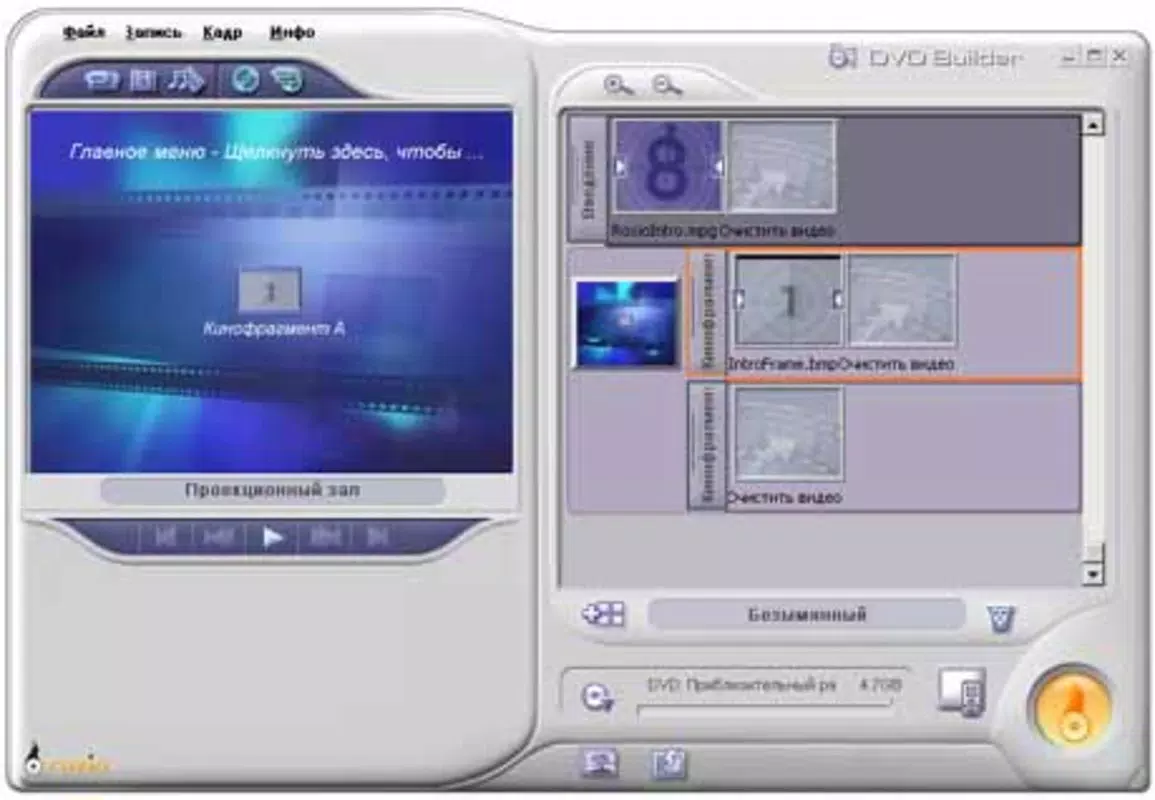
DVDBuilder features a clean, minimalist interface that prioritizes clarity and usability. The layout is organized around core tasks—file import, format selection, menu customization, and burning—ensuring users can complete each step without confusion. Navigation is linear and predictable, aligning with the app’s step-by-step philosophy.
Visual elements are straightforward, with labeled buttons and status indicators that help users track progress. The absence of advanced toolbars or hidden menus supports the app’s goal of accessibility. Although the developer did not list formal performance metrics, the application’s small file size of 3.2 MB suggests efficient resource usage, likely contributing to stable operation on older or low-spec systems.
Responsiveness appears to be consistent, with minimal lag during file processing and menu editing. The app maintains stability during the burning phase, a critical stage where errors are common in similar software. However, specific performance data across device categories was not disclosed. Compatibility with modern Windows systems is not explicitly confirmed, but its long-standing presence suggests it may still function on updated platforms with appropriate compatibility settings.
Platform Compatibility & Technical Requirements
DVDBuilder is designed for the Windows platform and requires a Windows operating system. The software version is 1.0, released on August 1, 2006. The file size is 3.2 MB, indicating a lightweight application with minimal system footprint.
The developer did not specify minimum OS requirements, making it unclear whether the app supports current Windows versions such as Windows 10 or 11. Similarly, no details were provided about CPU, RAM, or storage requirements. This lack of technical information limits the ability to assess compatibility with modern hardware. Users are advised to test the application in a virtual environment or on older systems if compatibility issues arise.
Pros and Cons
Pros
- Simple, guided workflow ideal for beginners
- Supports both PAL and NTSC standards for regional compatibility
- Offers aspect ratio selection (16:9 and 4:3) for optimal display
- Customizable DVD menus with text effects
- Lightweight file size (3.2 MB) with low system resource usage
Cons
- No information on current OS compatibility or system requirements
- Limited to MPEG file input; no support for other video formats was mentioned
- Age of the software raises concerns about long-term support and updates
- Lacks advanced editing or encoding features
- Price point of $29.95 may be considered high for a basic tool with no recent updates
FAQ
Is DVDBuilder safe to download and install?
Yes, the app is available through official channels. However, users should ensure they download from trusted sources to avoid modified or bundled software.
Can I use DVDBuilder on Windows 10 or Windows 11?
The developer did not confirm compatibility with newer Windows versions. While the app may run on modern systems using compatibility mode, this is not guaranteed.
Does DVDBuilder support video formats other than MPEG?
The app is designed for MPEG files. No information was provided about support for alternative formats such as MP4 or AVI.
Is there a free version or trial of DVDBuilder?
Based on the provided information, DVDBuilder is a paid application with no mention of a free version or trial period.
How often is DVDBuilder updated?
The last release was in 2006. No updates have been reported since, suggesting the software is no longer actively maintained.
Final Thoughts + CTA
DVDBuilder remains a niche tool for users who need a reliable, no-frills solution for converting MPEG files into playable DVDs. Its strength lies in its simplicity, guided workflow, and focus on core functionality—making it a viable choice for those who value predictability over advanced features. While its age and lack of updates are notable drawbacks, the app still delivers on its core promise: creating high-quality DVDs with minimal effort.
It is best suited for individuals with legacy video collections, educators, or anyone seeking a straightforward way to burn content to physical media. For users with modern workflows, the app may feel outdated, but for those who still rely on DVD distribution, it offers a dependable option.
Despite its limitations, DVDBuilder stands as a testament to the value of focused, user-centered design. If you’re looking to create DVDs from MPEG files without complexity, this app remains a functional tool worth considering.
Download DVDBuilder now


